
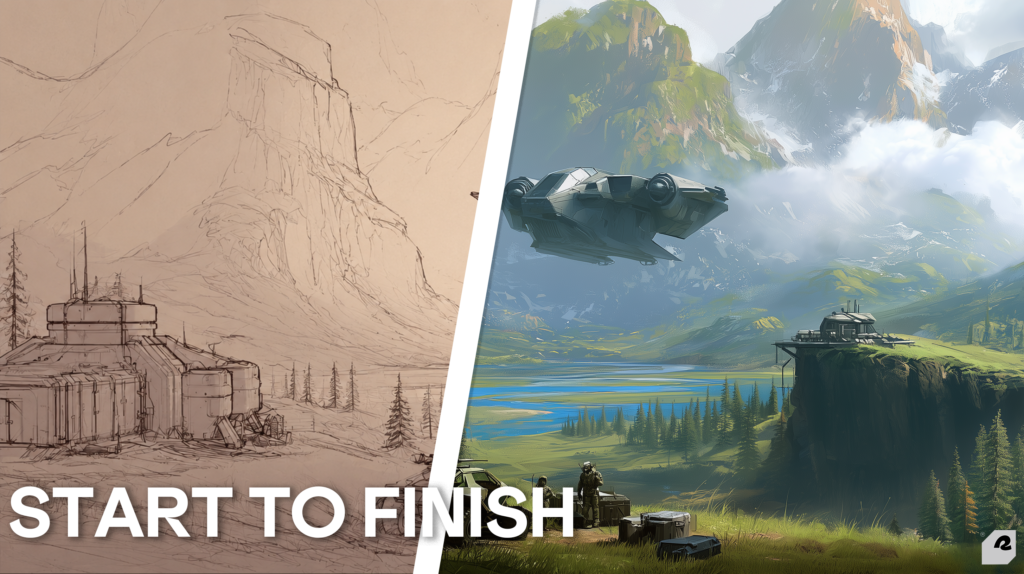
Most people think concept art is about drawing. It isn’t. It’s about deciding.
You open a blank canvas. You have a brief, a vague mood, and a deadline. Between that blank canvas and a finished world sit dozens of choices. Which silhouette reads best? What does the light say about this place? Where does the eye land first?
Learning how to make concept art means answering those questions in order. Skip the order, and the work collapses. Beautiful renders die. Weeks vanish. Clients lose faith.
This guide walks the full process, stage by stage. However, it also covers the part nobody teaches. How does a visual direction actually get locked so production can start? That’s the line between a portfolio piece and a production asset. At Raysome Studio, we live on that line daily.
Here’s the whole pipeline, from first idea to final direction.
Quick Answer: The Concept Art Process in Seven Stage
The process follows a repeatable sequence. Each stage answers one question before the next begins.
- Brief — What problem are we solving? Who is it for?
- References — What visual language does this world speak?
- Thumbnails — Which composition and silhouette work best?
- Silhouette test — Is the shape readable at a glance?
- Value study — Where does light fall, and where does the eye go?
- Color — What does this world feel like?
- Final render and handoff — What does the production team need?
Move forward only when the current stage wins approval. Consequently, mistakes stay cheap. Change a thumbnail, lose an hour. Change a finished render, lose a week.
What Concept Art Actually Is (And What It Isn’t)
Concept art is visual problem-solving. Its job is to cut risk before anyone spends real money.
A concept isn’t the final product. It’s the blueprint. Film crews build sets from it. Game teams model characters from it. Directors approve a look from it. Therefore, a concept succeeds when it answers a question. Not when it looks pretty.
That distinction changes everything about how you work.
Concept Art vs. Illustration
People mix the two up all the time. Yet their goals are opposite.
Illustration finishes an idea. Concept art tests one. As Argentics puts it, concept artists are visual problem-solvers. Illustrators are visual stylists. Both matter. But they aim at different things.
Illustration rewards polish. Concept art rewards speed and range. Tatiana Nazhimova has drawn for video games for around a decade. She makes the point plainly. Most of a concept artist’s time goes into finding the design. Very little goes into rendering textures and lighting. That ratio is the whole job.
Spend four hours on rim lights and twenty minutes on the idea, and you’re illustrating. You’re not concepting.
Stage 1 and 2: The Brief and the Reference Wall
Every concept starts with a brief. Most bad concepts start with a bad one.
A brief is the deal between the idea and the image. It names what the piece must say. It names who will see it. Then it names the limits you must work inside. Without a brief, you’re guessing. And guessing is expensive.
How to Write a Concept Art Brief
A good brief answers five questions. Nothing more, nothing less.
- What is it? A character, a place, a prop, a vehicle.
- What’s the story? Tone, world, era, mood, role.
- Who sees it? Players, readers, a pitch deck, your own team.
- What are the limits? Engine, budget, style guide, palette.
- What ships? One key image, a turnaround sheet, a full design package.
Ask these before you draw a line. Above all, ask them out loud. A five-minute call kills a two-week rework.
Gathering References Without Drowning
References root a concept in the real world. Yet research can swallow you whole.
The fix is simple. Set your direction before you start collecting. Janessa Kuek is an environment concept artist. She sets a clear goal first. That goal keeps her reference hunt focused. It also keeps the final look coherent. Without one, you drift.
Build a wall, not a folder. Buildings, textures, weather, cloth, light, real objects. Pull from life more than from other artists’ work. Otherwise, your concept becomes a remix of someone else’s.
Stage 3 and 4: Thumbnails and Silhouettes
Now you draw. Fast, small, and ugly.
Thumbnails are throwaway sketches. Their job is range, not polish. You generate options so the good one can reveal itself. Clip Studio’s guide frames the work as trial and error. Early stages depend on small, clear thumbnails that hold one idea each.
Make more than feels comfortable. Five is a start. Twenty is better. Most will die, and that’s the point.
Composition gets decided here too. Rodney Fuentebella supervises concept art at Marvel Studios. He organizes busy shots with a single viewpoint. One-point perspective makes the subject easy to find. Meanwhile, pipes, lights, and fixtures act as arrows aimed at it. That’s not decoration. That’s direction.
The Silhouette Test
Here’s the fastest quality check in the business.
Fill your design with solid black. Remove every detail. Now look at it.
Can you tell what it is? Can you tell what it does? If yes, the shape works. If not, go back to thumbnails. VSQUAD’s art director runs this same test. He notes that the silhouette is the first thing a player sees.
Details can’t rescue a weak shape. They only decorate the failure. This matters most in character design. A hero has to read across a battlefield. She has to read small, in motion, mid-fight.
Stage 5: Value Studies (The Stage Everyone Skips)
Value is how light or dark a color is. It carries more meaning than hue does.
Strip the concept to grayscale. Block in the light. Decide where the eye should land. Only then does color join the conversation.
Beginners skip this and pay for it. Ekaterina Shapovalova, a lead artist, names the failure exactly. Artists spread the full value range across the whole image. Deepest shadow sits beside brightest highlight everywhere. So nothing stays in reserve for the focal point. The result is muddy. Everything shouts, so nothing does.
Save your darkest darks and brightest brights. Spend them where you want the eye.
Planning here feels slow. Nevertheless, it’s faster overall. Concept artist Mattia Rangoni argues the same. Thinking through each step dodges mistakes and saves time later. Speed-painting suits the already-trained. It is not a shortcut for the learner.
Want to see disciplined value work at the finish line? Our portfolio shows the results. The grayscale layers stay backstage, where they belong.
Stage 6 and 7: Color, Render, and the Handoff Package
Color is storytelling. It sets temperature, era, threat, and comfort. All of that lands before a viewer reads one detail.
Test palettes as options, not as choices. Test a warm version and a cold one. Test a limited palette against a broad one. Then pick the one that serves the story. Not the one that looks nicest alone.
Render last. Render least. Add detail only where the eye should travel. Leave the rest suggested. Overworking is a real trap. The image gets busier while the idea gets weaker.
What Goes in a Final Concept Package
A concept isn’t done when it looks good. It’s done when someone else can build from it.
That usually means:
- Turnarounds — front, side, back, plus any hidden detail
- Callouts — close-ups of materials, joins, and moving parts
- Orthographic views — clean, flat references for modelers
- Layered files — PSDs the 3D team can pull apart
- Notes — margin comments for what the image can’t show
Miss these and the modeler guesses. VSQUAD’s team warns about exactly this. A careless concept forces the 3D artist to fill the gaps alone. Nothing guarantees they guess right.
The Part Nobody Teaches: Locking a Visual Direction
Here’s where most tutorials stop. It’s also where real projects fall apart.
You can run all seven stages beautifully and still fail. Why? Nobody agreed on when the direction was final. So the client rethinks the mood at color stage. The art director questions the silhouette after render. Two weeks evaporate.
The pipeline moves a project from doubt to clarity. MAGES Institute frames the stakes bluntly. Projects rarely fail on a weak idea. They fail on a murky pipeline. Studio post-mortems keep saying the same thing. Early clarity would have saved months of rework.
So gate it. Every stage needs a sign-off before the next one starts.
Why Rework Happens at the Wrong Stage
The cost of a change climbs hard as you move down the pipeline. Here’s the honest math:
| Stage | What gets decided | Cost to change here | Who signs off |
|---|---|---|---|
| Brief | Scope, tone, audience | Nearly free — a conversation | Client + Art Director |
| Thumbnails | Composition, silhouette | Low — redraw in an hour | Art Director |
| Value study | Light, focus, depth | Moderate — half a day | Art Director |
| Color | Mood, palette | High — a full repaint | Client |
| Final render | Detail, finish | Severe — start over | Locked |
Read that table again. A silhouette change at thumbnail stage costs an hour. The same change after render costs a week.
At Raysome, we lock direction before color, never after. In grayscale, the client approves composition, focal point, and read. In color, we execute what they approved. Those are two different conversations. Merging them is how projects bleed.
We also agree the number of revision rounds upfront. It sounds bureaucratic. In practice, it’s the kindest thing you can do for the relationship. VSQUAD’s art director reports the same. Setting revision counts early kills most late-stage conflict.
Clear gates protect the client’s budget and the artist’s sanity. That’s not paperwork. That’s craft.
Where AI Fits in the 2026 Concept Art Workflow
Let’s be honest here. Dodging the question helps nobody.
AI is truly useful in early exploration. It makes range fast. A mood you hadn’t considered shows up in seconds. Reference walls fill in minutes, not hours. Many studios use it right there, in ideation, where the images get thrown out anyway.
However, it doesn’t lock a direction. RGD’s 2026 guidance puts it carefully. Generated output still needs a hard look and real cleanup. The tool inspires. It doesn’t finish.
That matches what we see. AI produces images. This craft produces decisions. A model can render a spectacular gate to a ruined city. Yet it can’t tell you why the gate is broken. It can’t tell you what that says about the people inside. Nor can it check whether the silhouette still reads at 40 pixels on a minimap.
Use it for exploration. Keep the judgment human. Send a generated image to a client as a locked direction, and you’ve skipped every gate that protects the project.
How to Make Concept Art That Actually Gets Used
Five habits separate a portfolio piece from a production asset.
Solve, don’t decorate. Name the problem the image answers. Can’t name it? Then you’re not ready to render it.
Do the ugly work first. Thumbnails and value studies feel unglamorous. Yet they decide if the piece works.
Design for the next person. A modeler, an animator, or a printer opens your file next. Build for their hands, not just a screen.
Show your process. Studios hire the artist who cuts risk. A portfolio of polished finals hides the thinking that matters most.
Respect the gates. Win approval at each stage. Then move.
This discipline carries beyond games and film. We run the same pipeline on brand identity work. Brief, references, thumbnails, direction lock, execution. A brand world and a game world are both worlds. Both need someone to decide the look before anyone builds it.
Frequently Asked Questions
How long does it take to make a piece of concept art?
It varies with scope. A quick thumbnail takes minutes. A rough scene sketch might take a day. Meanwhile, full key art with turnarounds and callouts runs one to two weeks. The brief drives the timeline more than the drawing does.
Do I need to draw well to make concept art?
You need to draw clearly, which isn’t the same thing. The work rewards the basics over flashy rendering. Anatomy, perspective, value, composition. A readable sketch that solves the problem beats a gorgeous painting that doesn’t.
What software do concept artists actually use?
Photoshop and Procreate rule 2D work. Clip Studio Paint stays popular for its perspective rulers and 3D models. Blender handles blockouts, light studies, and scale checks. Most pros mix two or three. Few master just one.
What’s the difference between concept art and illustration?
One is a step in a pipeline. The other is a finished product. A concept exists so a team can build from it. An illustration exists to be looked at. Same skills, different end point.
How many thumbnails should I make before committing?
More than you want to. Five is a floor, not a target. Pros often push into the dozens. The goal is range. You’re hunting the option you didn’t think of first.
Can AI make concept art?
AI can generate the images. It struggles to make the decisions. It’s strong at early mood exploration and reference gathering. It’s weak at locked direction, consistency across a set, and the design logic a 3D team needs. Treat it as an ideation tool, not a deliverable.
Do concept artists need a degree?
No. Studios hire portfolios, not diplomas. Art school buys you structure and a network. Self-study buys you speed and cash. Either path works. The portfolio gets you the job.
The Takeaway
Three things are worth remembering.
Concept art is decision-making that looks like drawing. The image is a byproduct, not the goal.
The order of stages keeps mistakes cheap. Brief, references, thumbnails, silhouette, value, color, render. In that sequence, every time.
Finally, direction gets locked in grayscale, not in color. An hour spent gating properly saves a week of repainting.
Work With Us
Building a world? Someone has to decide what it looks like first. That’s the work we do.
See how Raysome Studio’s concept art service works. Or tell us about your project, and we’ll walk you through it.